

Modern businesses are constantly migrating data. Whether moving to the cloud, consolidating systems after a merger, upgrading infrastructure, or implementing new business applications, data migration is often at the heart of digital transformation initiatives.
However, enterprise data migration is rarely as simple as moving files from one location to another. Large-scale migrations involve massive volumes of business-critical information, multiple source systems, legacy applications, compliance requirements, and complex dependencies. Without proper planning and execution, migration projects can quickly run into delays, cost overruns, data integrity issues, and operational disruptions.
Understanding the common causes of migration failure can help organizations build a more resilient and successful migration strategy.
Why data migration projects fail
Many migration projects fail not because of technology limitations, but because organizations underestimate the complexity involved in moving and validating enterprise data.
Common challenges include:
- Incomplete assessment of source systems
- Poor data quality
- Legacy format incompatibilities
- Network interruptions and API limitations
- Data corruption during transfer
- Compliance and audit risks
- Excessive manual intervention
When these issues combine, businesses face delayed projects, unexpected costs, and increased operational risk.
The seven most common causes of migration failure
1. Poor pre-migration assessment
One of the biggest mistakes organizations make is starting migration activities without fully understanding their data landscape.
Many enterprises have accumulated years of information across email systems, file servers, cloud applications, databases, and collaboration platforms. Without a clear inventory, hidden dependencies and unexpected data volumes often emerge midway through the project.
How to avoid it
- Conduct a comprehensive data audit
- Identify source systems and dependencies
- Define ownership and governance policies
- Estimate data volumes accurately
- Establish clear migration success criteria
2. Migrating low-quality data
Moving outdated, duplicate, or corrupted data into a new environment simply transfers existing problems into the target system.
Poor-quality data can negatively impact performance, searchability, analytics, compliance, and user adoption.
How to avoid it
- Remove duplicate records
- Archive obsolete information
- Standardize data formats
- Validate metadata consistency
- Clean and normalize datasets before migration
3. Legacy format compatibility issues
Many organizations still maintain data in proprietary or outdated formats such as PST, MBOX, EML archives, legacy databases, and custom application exports.
Modern cloud platforms may not support these formats directly, creating compatibility challenges during migration.
How to avoid it
- Assess format compatibility early
- Convert legacy data into modern formats
- Preserve metadata and folder structures
- Validate converted data before import
4. Network interruptions and API limitations
Large-scale migrations often involve moving terabytes of data across networks and cloud environments.
Network instability, bandwidth constraints, and API throttling can significantly slow migration progress or cause transfers to fail entirely.
How to avoid it
- Use migration tools with retry and resume capabilities
- Plan migrations during low-traffic periods
- Monitor API rate limits
- Implement automated recovery mechanisms
5. Data integrity risks
A migration is only successful if every file, message, attachment, and record arrives intact.
Missing files, corrupted content, incomplete transfers, and altered metadata can create serious operational and legal consequences.
How to avoid it
- Validate data before and after migration
- Perform checksum verification
- Generate detailed migration logs
- Conduct reconciliation testing
6. Compliance and regulatory gaps
Organizations operating in regulated industries must preserve records exactly as required by law.
If metadata, retention policies, timestamps, or ownership information are altered during migration, compliance violations can occur.
How to avoid it
- Preserve original metadata
- Maintain audit trails
- Document chain of custody
- Validate regulatory requirements before migration begins
7. Over-reliance on manual processes
Manual extraction, conversion, validation, and migration activities increase the likelihood of human error while significantly extending project timelines.
As data volumes grow, manual methods become increasingly difficult to manage.
How to avoid it
- Automate repetitive migration tasks
- Use centralized migration platforms
- Monitor progress through dashboards
- Reduce dependence on manual scripting
| Phase | Key activities | Outcome |
|---|---|---|
| Assessment | Data discovery, dependency mapping, volume analysis | Reduced surprises and better planning |
| Optimization | Data cleanup, deduplication, format standardization | Improved data quality and reduced migration complexity |
| Execution | Automated migration, monitoring, error handling | Faster, more reliable data transfers |
| Verification | Data validation, integrity checks, audit reporting | Accurate, compliant, and trustworthy migration outcomes |
Organizations that invest time in each phase significantly improve migration success rates while reducing business risk.
Traditional migration vs Legacyflo
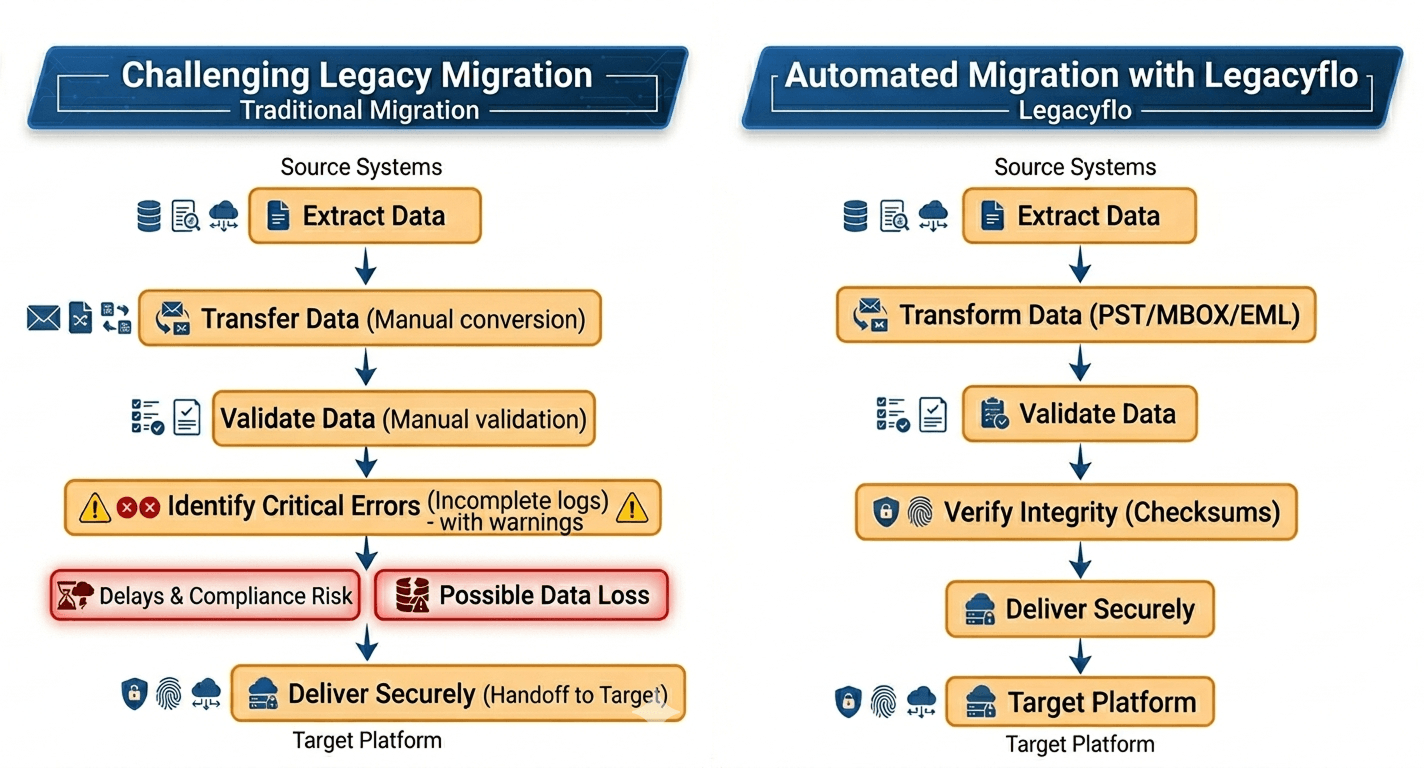
Built-in advantages
✓ Auto Resume Capabilities
✓ Intelligent API Throttling Management
✓ Automated Format Conversion
✓ Data Integrity Verification
✓ Comprehensive Audit Logs
✓ Compliance-Ready Processing
How Legacyflo helps reduce migration risk
Enterprise migration projects require more than simple file transfer utilities. They require a platform capable of handling extraction, transformation, validation, and delivery at scale while preserving data integrity.
Legacyflo is designed to automate complex enterprise data migration, conversion, backup, and extraction workflows through a scalable, asynchronous processing framework.
Key capabilities include:
- Automated extraction from cloud and on-premises environments
- Support for legacy and proprietary formats
- Intelligent retry and resume functionality
- Automated data transformation and normalization
- Cryptographic checksum verification
- Detailed execution logs and audit trails
- Secure delivery to cloud platforms and archival systems
By automating critical migration processes, Legacyflo helps organizations reduce operational risk, accelerate project timelines, and maintain complete confidence in data accuracy throughout the migration lifecycle.
Building a successful migration strategy
Data migration is a foundational component of digital transformation. When executed correctly, it enables modernization, operational efficiency, improved accessibility, and long-term scalability.
Organizations that focus on thorough planning, data quality, automation, and validation are far more likely to achieve successful migration outcomes while avoiding costly disruptions.
With the right strategy and tools in place, businesses can move critical data securely, efficiently, and confidently while maintaining compliance, continuity, and data integrity every step of the way.
Discover how Legacyflo helps organizations automate data migration, conversion, backup, and extraction while ensuring data integrity, compliance, and business continuity.